Skip to content
Early-bird$4.99, normally $19

Your Mac’s files, finally beautiful.

Finder shows you a list of filenames. Homy shows you your stuff. Big, clear thumbnails for everything, and a search that understands plain English.

macOS 14+ · Apple silicon & Intel · Homy is a Mac app

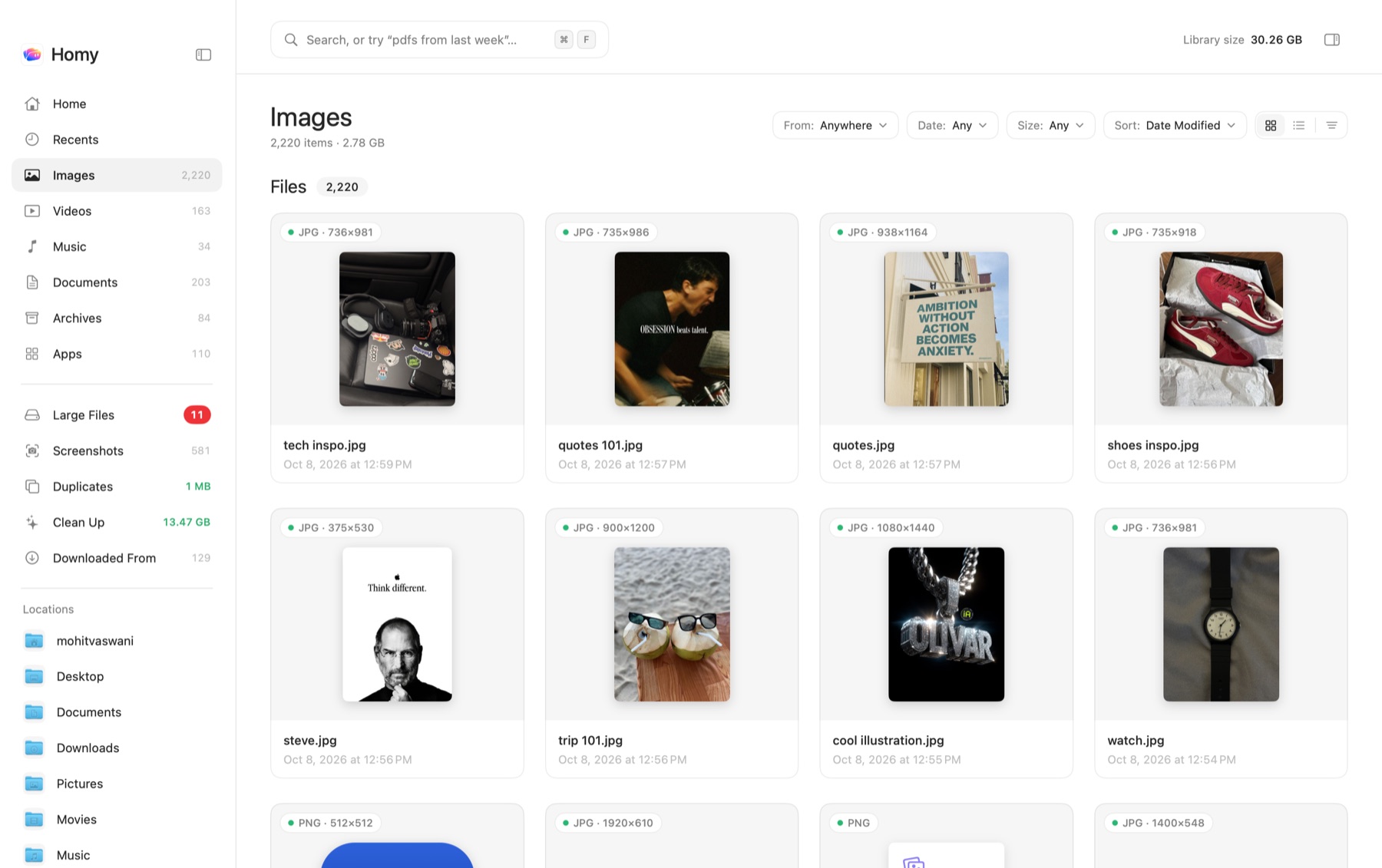
Homy showing the Images library as a grid of large thumbnails, with the sidebar listing Home, Recents, Images, Videos, Music, Documents, Archives and Apps
  • Images
  • Videos
  • Music
  • Documents
  • Archives
  • Apps

Images, videos, music, documents, archives and apps. Each one gets its own shelf, so you can see what you have at a glance.

Find anything. Just ask.

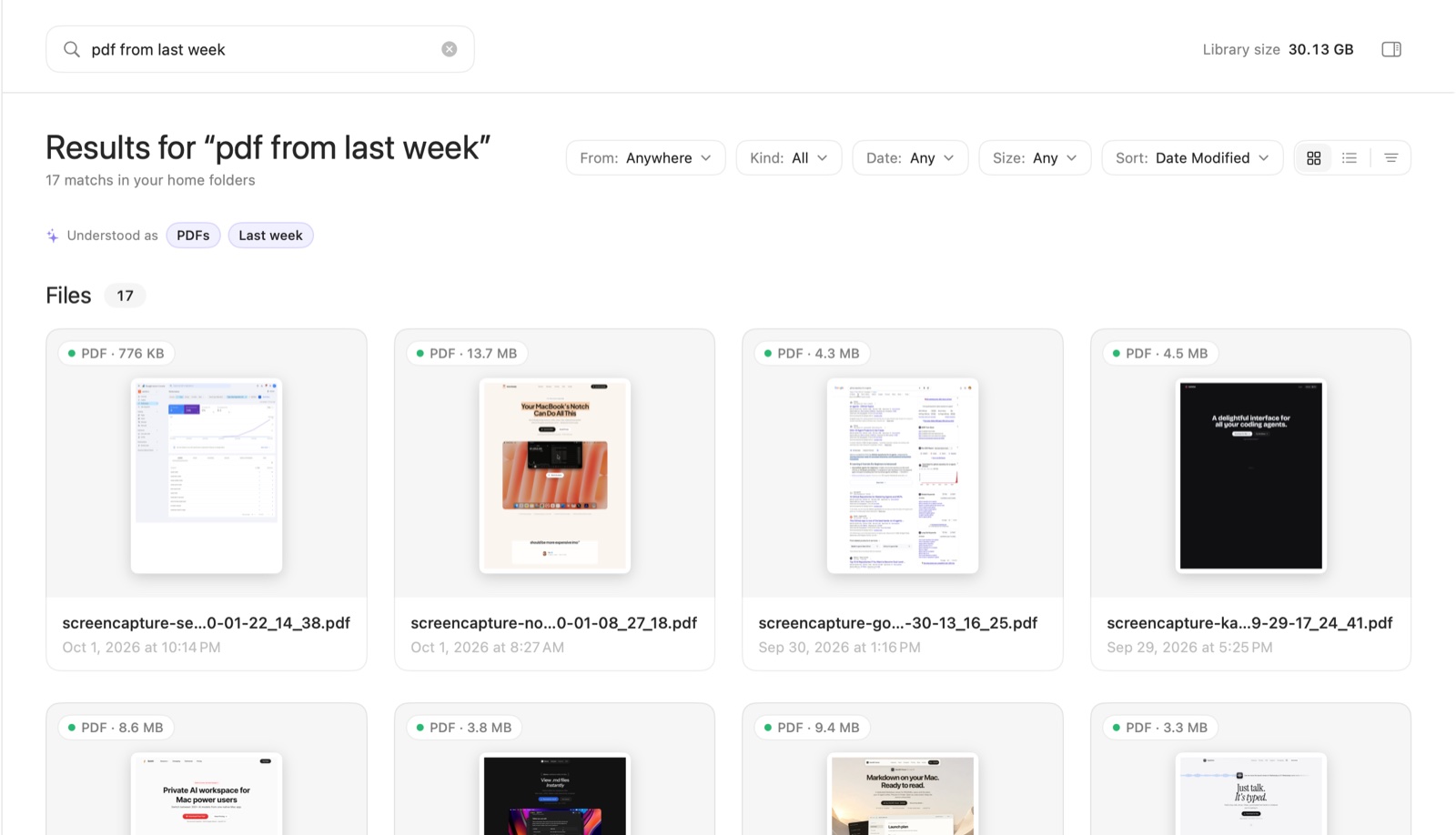
No folders to dig through and no syntax to learn. Homy shows you exactly how it understood you.

Example search: pdfs from last week over 5 mb

Understood asPDFsLast week> 5 MB

Files6

PDF · 13.7 MB

Q3 Board Deck.pdf

Oct 3 at 4:12 PM

PDF · 6.1 MB

Lease agreement.pdf

Oct 2 at 11:08 AM

Built for the way you actually lose files.

Five things Finder can’t do, each one a shortcut away.

2Text in images

Search the words inside your screenshots.

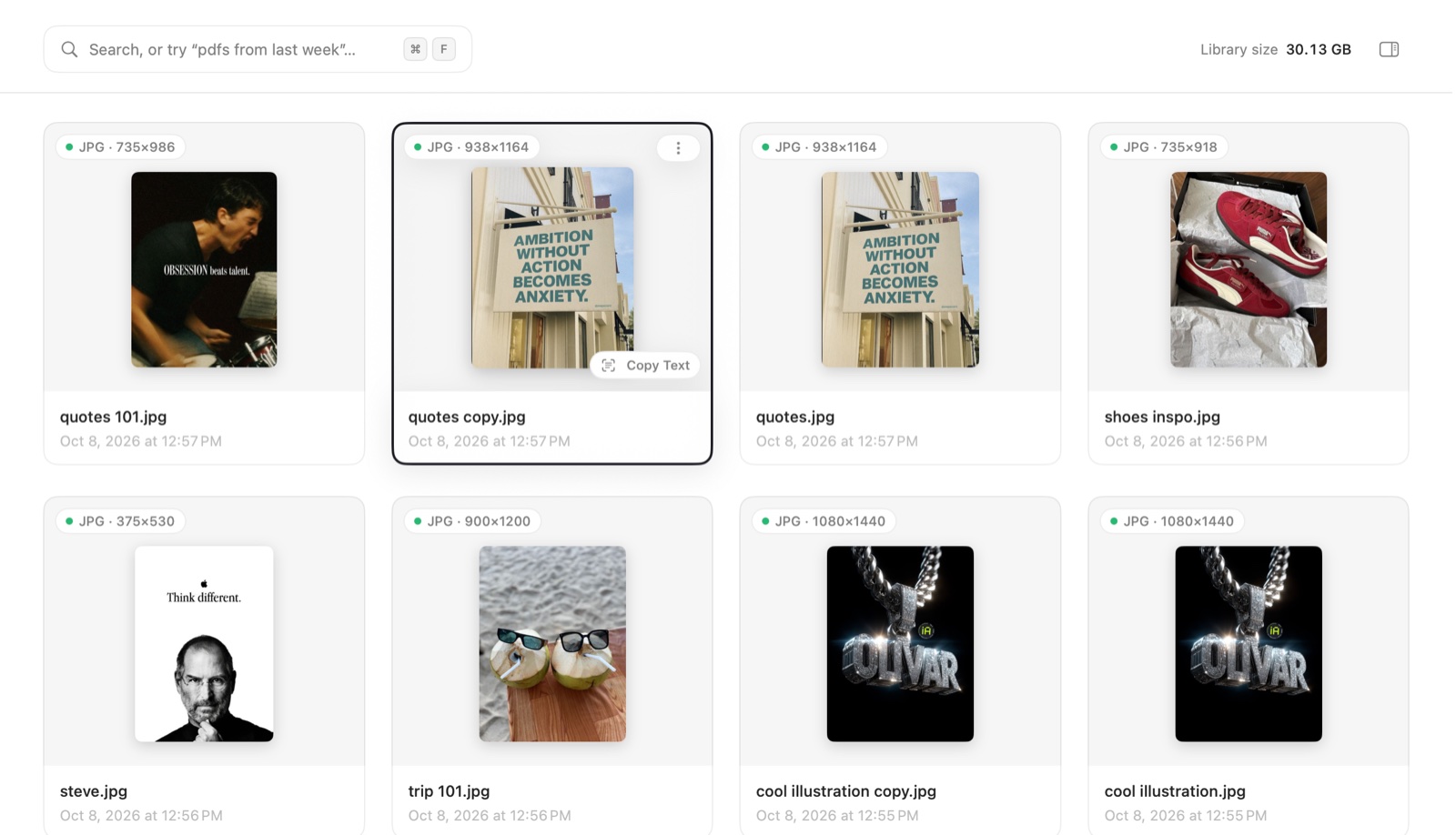
Homy reads the text in your screenshots and recent photos right on your Mac, using Apple’s Vision framework. That Wi-Fi password, the tracking number, the quote you saw once: just search for it.

  • Copy all the text from one or several images and PDFs
  • Hover any image for a Copy Text button
  • Open a preview and turn on Select Text to grab just the words you need

Copy Text

An image of a poster in Homy with a Copy Text button on hover

Copied text from 1 image

AMBITION WITHOUT
ACTION BECOMES
ANXIETY.

3Downloaded From

Remember where it came from.

Every download, grouped by where you got it: Gmail, Google Drive, ChatGPT, Canva, X, Slack, WhatsApp, GitHub, browser extensions or any website.

  • A “From” filter appears in any list that has downloads
  • The Inspector shows each file’s source
  • Find that invoice by remembering the email, not the filename

Downloaded From

Downloaded From

913 files · 129 sources

  • Gmail

    14 files · 9.2 MB

  • Google Drive

    15 files · 457 MB

  • ChatGPT

    63 files · 98.3 MB

  • Canva

    79 files · 103 MB

  • X

    103 files · 119.9 MB

  • Slack

    22 files · 41.6 MB

  • WhatsApp

    37 files · 212 MB

  • GitHub

    12 files · 24.1 MB

  • Extensions

    31 files · 86.1 MB

  • Any website

    527 files · 1.4 GB

4Duplicates

One copy is plenty.

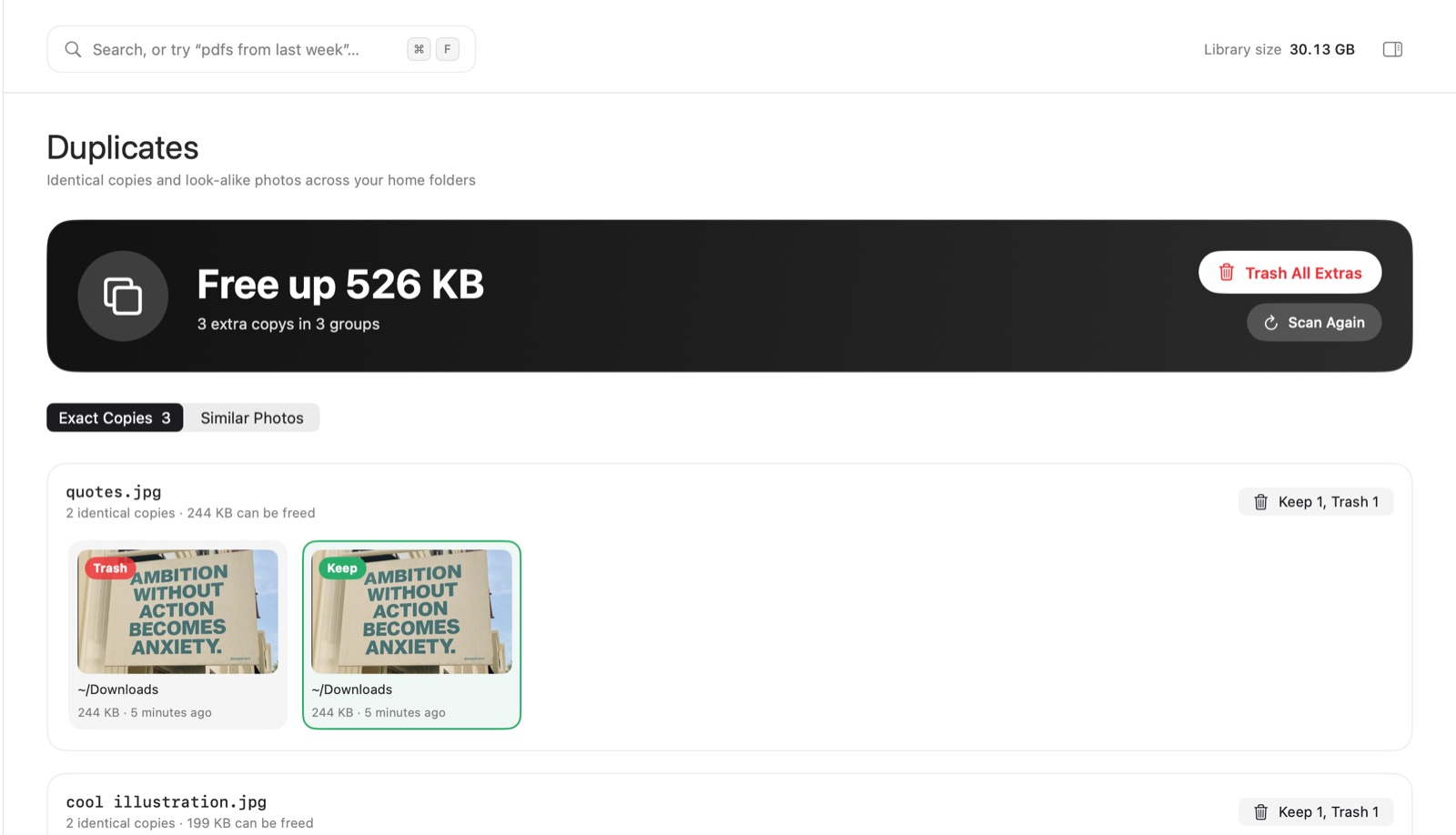
Homy finds identical files by their content (SHA-256 fingerprints) and look-alike photos too: bursts, edits and HEIC/JPEG pairs, using Vision feature prints.

  • See exactly how much you’ll free up
  • Homy picks a copy to keep. Click another to change it
  • The rest go to the Trash. iCloud-only files are skipped, so nothing gets downloaded

Duplicates

Duplicates view with a Free up banner, and pairs of identical images marked Keep and Trash

5Clean Up

Gigabytes back, safely.

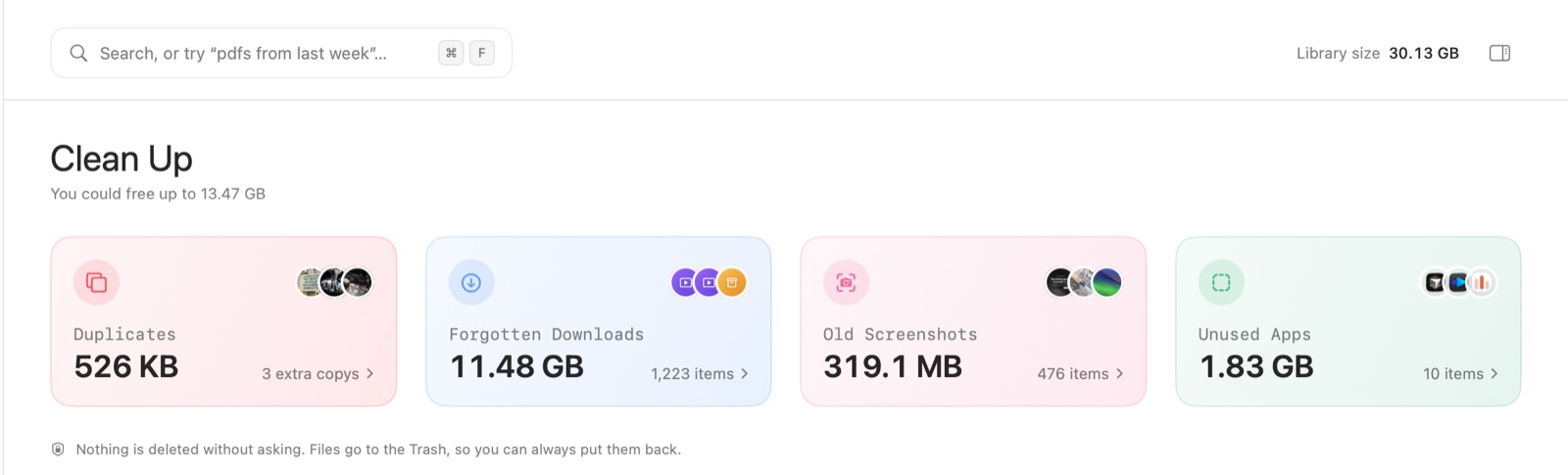
Smart cards on the Home screen point out old installers, forgotten downloads, old screenshots, big old videos and apps you don’t use anymore.

  • Each card opens a review page with Trash All or Trash Selected
  • Old .dmg and .pkg installers you already installed
  • Files go to the Trash, never deleted outright

Clean Up

Clean Up view with cards for Duplicates, Forgotten Downloads, Old Screenshots and Unused Apps

Duplicates + Clean Up

Free up 12.4 GB

Homy finds the stuff you forgot about and shows you what it’s worth. You review it, you decide. Everything goes to the Trash, so you can always put it back.

Duplicates Clean Up
  • Forgotten downloads4.2 GB
  • Old installers (.dmg, .pkg)3.6 GB
  • Duplicates & look-alikes2.1 GB
  • Big old videos1.2 GB
  • Old screenshots0.9 GB
  • Unused apps0.4 GB

Example scan. Your numbers will depend on your Mac.

And everything else.

The little things that make it feel like home.

  • Home dashboard

    Totals for every category, plus shelves of your recent photos, videos, music and documents.

  • Library sidebar

    Recents, Images, Videos, Music, Documents, Archives, Apps, Smart Folders for Large Files and Screenshots, plus pinned folders.

  • Grid or list

    Switch views, drag the thumbnail size slider, and sort by name, date, size or kind.

  • Quick preview

    Double-click or press Space. Use ← and → to step through files, Esc to close.

  • Music player

    Double-click a song and it plays right in the toolbar. ⌘← and ⌘→ to skip.

  • Inspector

    A live preview plus the details: dimensions, duration, camera and download source.

  • Right-click everything

    Quick Look, Open, Show in Finder, Pin to Sidebar, Copy, Copy Path, Move to Trash.

  • Drag and drop

    Drag any file out of Homy and into Mail, Slack, Figma or wherever it needs to go.

  • Automatic updates

    New versions download in the background and install when you quit. Nothing to babysit.

For keyboard people

  • Search
  • Grid
  • List
  • Inspector
  • Copy Text
  • Downloaded From
  • Duplicates
  • Clean Up
  • Preview
  • Play / Pause

Your files stay on your Mac.

Homy looks at your files so you don’t have to. It never sends them anywhere.

On-device. Always.

All text recognition and duplicate detection runs on your Mac. No account, no cloud, no uploads.

Text recognition
Apple Vision, on your Mac
Duplicate detection
SHA-256 + Vision feature prints, on your Mac
Network
Only the license check and the update check
  • Nothing is ever deleted outright

    Clean Up and Duplicates move files to the Trash. Changed your mind? Put them back.

  • iCloud stays in iCloud

    Files that only live in the cloud are skipped during scans, so nothing gets downloaded.

  • 100% native

    Built in SwiftUI. Small and fast, about a 5 MB download.

  • Signed and notarized

    Signed and notarized by Apple, so macOS knows it’s safe to open.

  • Light and dark

    Follows your Mac’s appearance, and looks good either way.

  • macOS 14 Sonoma or later

    Runs natively on Apple silicon and Intel Macs.

Simple, honest pricing.

One price. Every feature. Yours to keep.

Homy

Personal license

Early-bird

$4.99$19

One-time payment · no subscription

Early-bird price for the first 50 customers. Goes up to $19 after that.

  • Pay once and keep it. No subscription.
  • License key delivered by email
  • Activate in one click
  • Move to a new Mac anytime with “Deactivate this Mac”
  • Free updates
  • Every feature included

Payments handled securely by Dodo Payments

Questions, answered.

Does Homy replace Finder?

No. Homy works alongside Finder. It’s a nicer way to see and search your files, and “Show in Finder” is always one click away.

Do my files get uploaded anywhere?

No. Text recognition, search and duplicate detection all run on your Mac. Your files never leave it. The only network calls Homy makes are the license check and the update check.

Will it delete my files?

Only when you choose to, and only by moving them to the Trash. Nothing is ever permanently deleted, so you can always put a file back.

Why does it ask for access to Desktop, Documents and Downloads?

macOS asks you to approve access to those folders. Homy needs it so it can show and search the files inside them. Nothing is uploaded.

Which macOS versions are supported?

macOS 14 Sonoma and later, on both Apple silicon and Intel Macs.

Is it a subscription?

No. You pay once and keep it: $4.99 for early birds, $19 after the first 50 customers.

Can I use it on another Mac?

Yes. Open Homy › License…, choose “Deactivate this Mac”, then activate it on the new Mac with your license key.

Does it work offline?

Yes. The license only needs to check in occasionally, and Homy keeps working offline for up to 30 days in between.

How do updates work?

Homy checks for updates once a day, downloads them in the background and installs them when you quit. Updates are free.

I have another question.

Email epictools.io@gmail.com and you’ll hear back from the person who made Homy.

Stop digging through Downloads.

Give your files a home that’s nice to look at, and easy to search.

macOS 14+ · Apple silicon & Intel